How to check if a page is indexed by Google
URL Inspection, the site: operator, a plain search, or a bulk checker. Each answers a different question, and the wrong one leaves you sure of something false.
· Updated 9 September 2026
There are four ways to check whether Google has indexed a page, and they do not
answer the same question: URL Inspection in Search Console, searching the
exact URL, the site: operator, and a bulk checker. Only URL
Inspection is authoritative, and only a bulk checker handles a list.
URL Inspection covers one URL at a time, and only sites you have verified. An
exact-URL search gives a fast yes or no on any site. The site: operator is
unreliable as an index check and should not decide anything. A bulk checker is
the only one of the four that takes a list, or URLs you do not own.
| Situation | Use | Why not the others |
|---|---|---|
| One URL, your own site, need to know why | URL Inspection | Nothing else explains the reason |
| One URL, any site, need a fast yes/no | Search the exact URL | Inspection cannot see sites you do not own |
| A list of URLs, or URLs you do not own | A bulk checker | Inspection has a daily quota; site: hits a CAPTCHA |
| Getting a feel for a site’s shape | site:, with suspicion | It is an approximation, not a lookup |
Knowing which is which saves you from being confidently wrong about a list you never actually checked.
1. URL Inspection — authoritative, one URL at a time
In Search Console, paste the URL into the inspection bar at the top.
This is Google telling you directly what it knows about that URL: whether it is in the index, when it was last crawled, which canonical it chose, and whether anything is blocking it. None of the other three methods is as trustworthy.
Use it when you have a specific URL and you want the real answer, including why.
Its limits, and they are hard ones:
- Only for properties you have verified in Search Console. Your own sites, and nothing else.
- One URL per check, with a daily quota that runs out well before a real list does.
- No way to check a hundred URLs and compare against last month.
2. Searching the exact URL — quick, decent, slightly noisy
Paste the full URL into Google as a search query.
If the page is indexed you usually get it back as the only result. If you get nothing, or you get other pages from the site, that is a real signal.
Use it when you want a five-second answer about one page on any site.
Where it misleads you: a page can be indexed under a canonical you did not expect, so “my exact URL did not come back” sometimes means “Google indexed the version without the tracking parameter” rather than “this content is missing”. That is still worth knowing — but it is a different fact.
The same goes for a URL that redirects. Google indexes the destination and files the old address under Page with redirect, so the URL you searched for will not come back even though the page is in the index.
3. The site: operator — the popular one, and the least reliable
site:example.com/page feels like the professional move. It is the one to
distrust.
Google has said plainly that site: is not a reliable index diagnostic. It is
an approximation for exploring a site, not a lookup against the index. It omits
pages that are indexed, its counts are estimates, and the results shift between
runs for reasons that have nothing to do with your site.
It also does not scale. Run it a few dozen times in a row and you will meet a CAPTCHA — the interface is built for people browsing, not for anyone working through a list. Why Google keeps showing a CAPTCHA explains what triggers it and why solving it does not make it stop.
Use it when you want a rough sense of a site’s shape. Do not use it to decide whether one page is indexed, and do not use it to audit a list.
4. A bulk checker — the only one that answers a list
URL Inspection, an exact-URL search and site: all break at the same two
places: volume, and someone else’s domain.
The situations where that bites are the common ones in real SEO work:
- You built 200 links — guest posts, directory listings, profile pages — and need to know how many were ever indexed. You do not own those sites, so Search Console has nothing to say about them.
- You consolidated 400 product pages last month and want to know whether the canonical strategy actually took.
- You publish weekly and want to know how many of last quarter’s posts made it in.
The first of those has its own guide: how to check if your backlinks are indexed covers what to check on a linking page besides the index, and what you can and cannot do about the ones that are missing.
A bulk checker asks the practical question — is this URL findable in Google right now — for every URL at once. It is not a substitute for URL Inspection’s diagnosis on your own site. It is the answer to the question Inspection cannot be asked at scale.
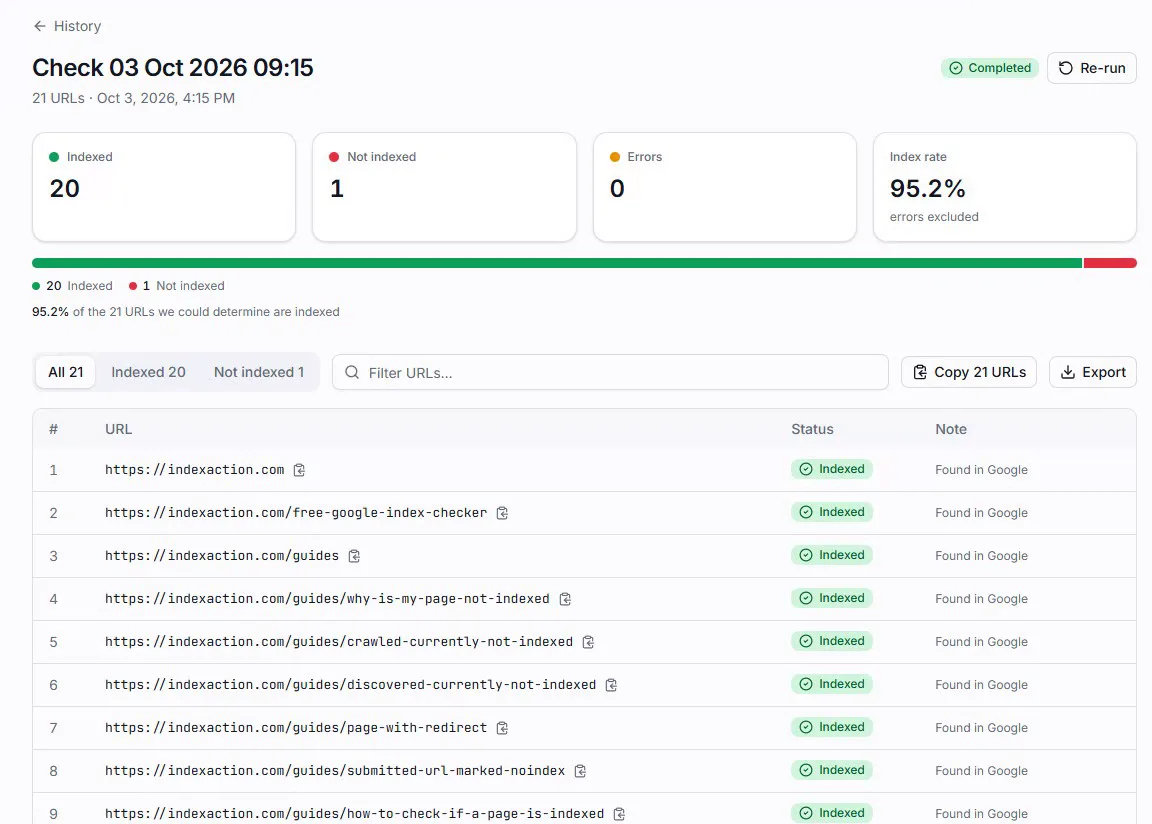
To see what a bulk verdict looks like on your own URLs, our
free index checker takes ten of them with no
account and no site: searches, and gives you one verdict each.
The mistake worth avoiding
Checking three URLs by hand and generalising to three hundred.
It is the natural thing to do — you fix an issue, spot-check a couple of pages, see them indexed, and move on. The pages you happen to check are almost never a fair sample. They are the ones you were already thinking about, which usually means the ones with the most internal links and the most attention.
If a change was meant to affect a list, verify against the list.
indexaction runs up to 1,000 URLs in one check and returns a verdict per URL,
with no site: searches and no CAPTCHA. It works on any domain, including sites
you do not own. New accounts get 50 free credits — one credit per URL checked —
after verifying their email.
If you are here because of a Search Console status, the two guides worth reading next are Crawled – currently not indexed and Discovered – currently not indexed.
Once a page is indexed, the next question is where it sits — and the position you see is not the one your customer sees: why your Google rank looks different explains what moves it, and how to check your Google ranking compares Search Console, a manual search and a rank tracker.